Elegant Watercolor Florals: A Designer's Guide to Wedding Stationery
There's a certain magic in watercolor that digital precision can't quite replicate. The soft bleed of dusty rose petals, the organic texture of greenery leaves, the way colors blend and breathe on paper. When you're designing for a wedding—a day built on emotion and personal story—this hand-painted aesthetic feels authentic and deeply personal. It's why watercolor floral graphics have become a cornerstone of modern wedding stationery, offering a blend of romance and sophistication that feels both timeless and fresh.
Beyond the Invitation: Building a Cohesive Wedding Brand
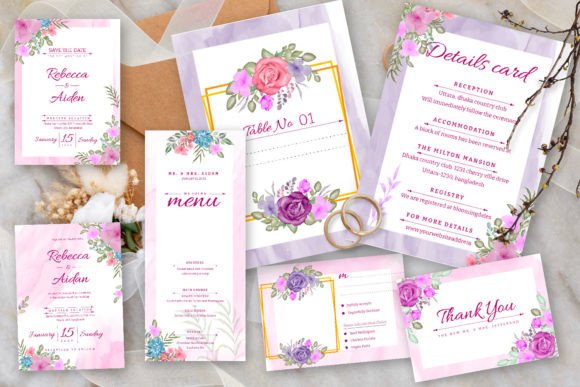
Think of a wedding not just as an event, but as a brand experience for the couple. The Watercolor Flowers Wedding Set Graphic provides the foundational visual language for that entire brand. The elegant wedding invitation template with its dusty rose and greenery leaves is the centerpiece, but its true power lies in its versatility. That same floral motif can be adapted across every touchpoint, ensuring visual consistency from the first save-the-date to the thank-you cards. This is where the included editable vector files in EPS and JPG formats become invaluable. A designer or a hands-on couple can take that single floral element and resize it, recolor it, or isolate specific blooms for use on program covers, menu cards, seating charts, and even custom signage. This creates an unmistakable visual thread that ties the entire wedding narrative together.
The practical design assets included—a standard 5"x7" wedding card and a 3.5"x5" RSVP card with bleed—are your starting templates. But with vector editing in Adobe Illustrator or similar software, you're not locked into those dimensions. You can create a square social media announcement, a tall website banner, or a custom-shaped tag for favors. The ability to edit every component means the design adapts to your vision, not the other way around.
The Practical Designer's Toolkit: Files, Fonts, and Flexibility
Let's break down what you're working with. The set provides both EPS and JPG files. The EPS files are your editable vectors—essential for any professional output. They allow you to scale the graphics to any size without losing quality, which is critical for large-format prints like welcome signs or backdrops. The JPGs are ready-to-use raster files, perfect for quick digital use or as a base for mockups. This combination covers the full spectrum of production needs.
A thoughtful feature is the use of a free font. This removes a common barrier for couples or small design studios working with a tight budget. You can implement the typography immediately without worrying about additional licensing fees for the wedding suite. However, for designers looking to create a truly unique brand for the couple, this template becomes a springboard. You might pair the suggested script font with a clean, modern sans serif for body text on the website or information cards. Testing font pairings is key. The romantic script of the invitation might feel overwhelming on a small details card, where a simple serif or sans serif could improve readability while maintaining the elegant aesthetic.
From Digital Files to Tangible Keepsakes
The real-world applications extend far beyond paper. That watercolor floral graphic can be adapted for merchandise and wedding favors. Imagine it printed on tote bags for the bridal party, etched onto glassware for the reception, or used as a pattern for custom napkins. For a small business owner in the wedding industry, this set is a goldmine. A stationer can use it as a base for customizable templates sold on their website. A wedding planner can create cohesive proposal documents and day-of materials. A photographer might use the florals to design beautiful album covers or client gift packaging.
For content creators and bloggers in the bridal niche, the graphics offer a professional polish for social media and blog headers. The soft, romantic palette is inherently engaging on platforms like Instagram and Pinterest, helping to build a recognizable aesthetic. The key is to use these elements to support your content, not overpower it. A subtle floral border on a blog post about venue selection or a delicate watercolor accent on a Pinterest pin can increase visual appeal and audience engagement without distracting from the core message.
Making It Your Own: A Step-by-Step Approach
Getting started is straightforward. First, open the EPS file in your vector editing software. Familiarize yourself with the layers—the flowers, leaves, and text are likely on separate layers, making isolation and editing simple. To change the color of the dusty rose blooms, select the floral elements and adjust the hue, saturation, and brightness to match your specific palette. Maybe you're working with a deeper burgundy or a softer blush. The vector format makes this a non-destructive process.
Next, address the typography. The free font is included, but install it on your system first. Then, use the text tool to edit the placeholder names, dates, and details. Play with the kerning and leading to ensure the text feels balanced within the floral frame. For the RSVP card, consider whether the script font remains the best choice for the smaller text fields where guests fill in their names. Sometimes, a switch to a more legible typeface for that section is a practical design decision that improves the user experience.
Finally, consider the bleed. The templates include bleed lines, which are the extra margins beyond the final trim size. This is non-negotiable for professional printing, as it prevents unsightly white edges if the cut is slightly off. Always extend your background color or any design elements that touch the edge into this bleed area. When you export your final files for the printer, include the bleed in your PDF or print-ready file.
Ultimately, this watercolor floral set is more than just a pretty template. It's a versatile design system. It empowers you to create a professional, emotionally resonant, and perfectly coordinated wedding brand with the flexibility to adapt to any medium or size. Whether you're a designer serving a client or a couple crafting your own day, it provides the tools to translate a personal vision into a beautiful, tangible reality. The elegance is in the details, and with these editable vectors, every detail is in your hands.